
InkSmith can fill a visual template from structured data. Design the page once, connect its changing fields, and preview a record before producing the PDFs.
Prepare your data
CSV and JSON sources are available in Free mode. Use clear field names and keep one record per recipient or document. For example:
{
  "customer": { "name": "Ada Example" },
  "invoice": { "number": "INV-1042" }
}
A text element can refer to a field such as {{customer.name}}. The editor shows the binding controls for supported elements. Match the field path to the shape of your data.
Excel and database sources are Pro features. Their availability depends on your active licence.
Preview a real record
Open the data preview and move between records. Check long names, missing optional fields, currency, date formatting, and table rows before exporting. A record that fits one text frame may need more room in another language or with a longer address.
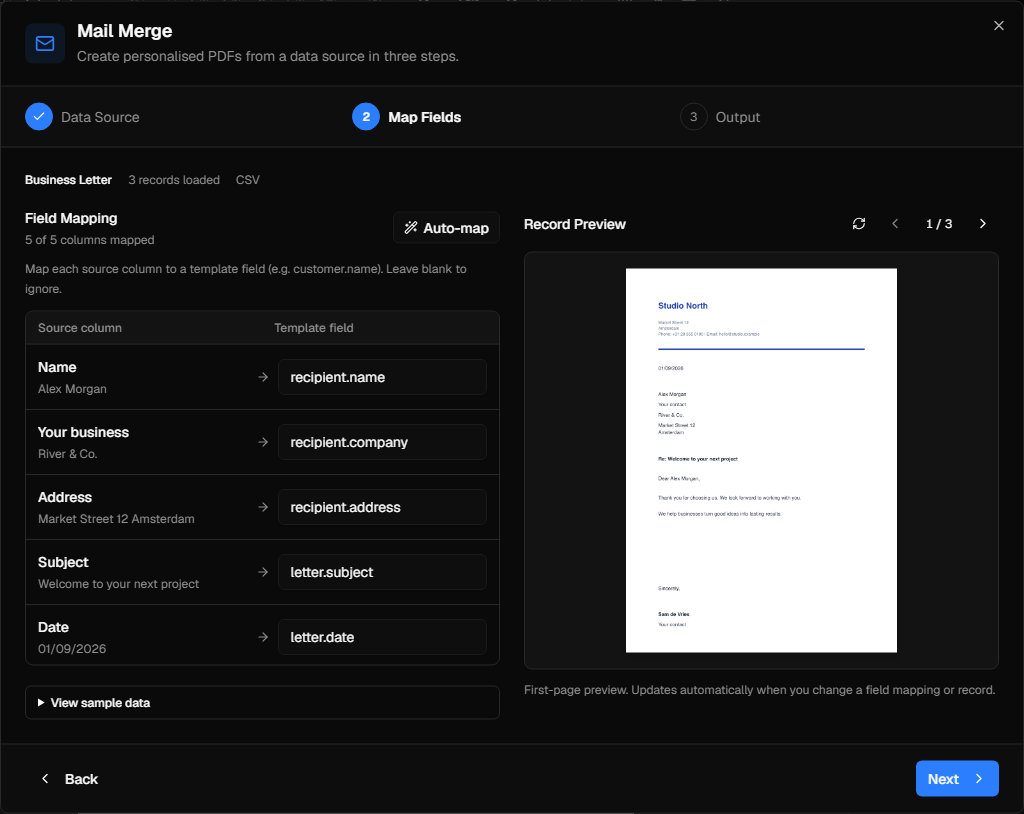
Run a mail merge
Choose the template and data source, review the preview, then export individual PDFs for the records you need. Pro can also create a single merged output. The edition limits are:
| Edition | Records per run | Merged single-file output |
|---|---|---|
| Free | 5 | No |
| Standard | 100 | No |
| Pro | Unlimited | Yes |
See the edition comparison for output quality and other production differences.
Keep the workflow safe
Use fictional records while designing. Before a production run, check the data source, record count, destination, and first few finished PDFs. Keep source files and generated documents in folders appropriate for your organisation's data-handling rules.